Stat Tracker

Tuesday, April 5, 2011

Salesforce ERD Tool Review - ERD Tool by Xactium

I just saw a twitter feed about a new ERD tool which is available in preview called "ERD Tool" which is provided for free by Peter Gascoyne and Xactium. 

You can get to the AppExchange listing here: https://sites.secure.force.com/appexchange/listingDetail?listingId=a0N30000003KNErEAO .  

Since I love entity relationship diagrams, I had to check it out. I find a good ERD can help keep you sane when dealing with large data models. And I'm frequently annoyed that I can't find ERD Tools that meet my needs. I feel like I've tried every ERD Plugin in eclipse and been disappointed everytime.

This application is very simple. Once you install it, all you have to do is select which objects you want to have available on the ER Diagram. It gives you a simple multiselect picklist where you pick and choose the objects:


After you click Save, it will take you to the Diagram page. Here you click the Sidebar button in the upper left to select which Objects you want to display in your ERD.
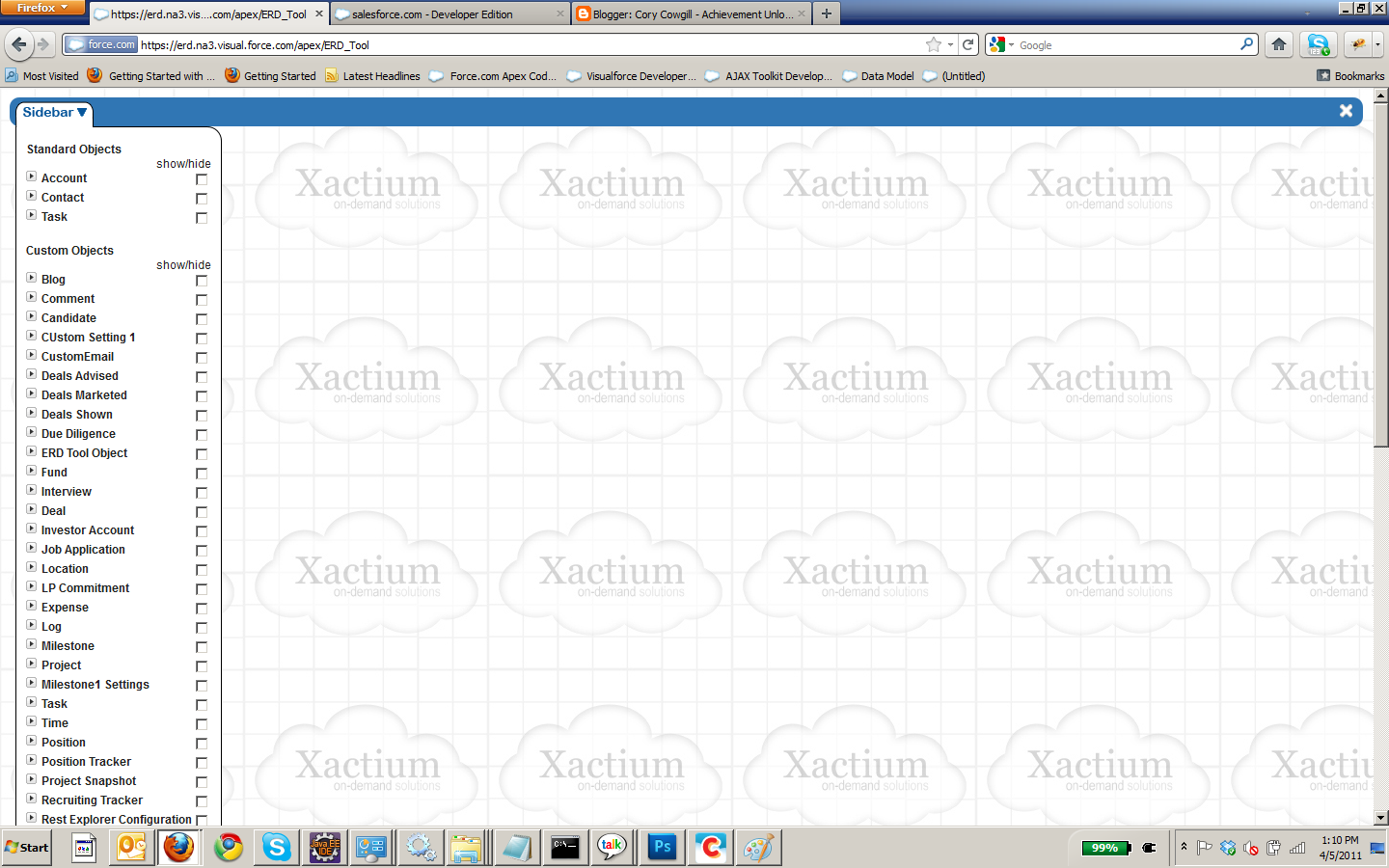
Now all you have to do is click on those objects, and the applicaiton will automatically start plopping the objects on the ERD. By default, it seems to give you the small (non-expanded) entity, but if you click the plus sign in the upper right it expands it with the field level information. Very cool! You can drag and move the entities around straight in your browser via HTML5 Canvas tag.


Bottom line: If your a SF Consultant or Developer who needs to generate ER Diagrams, check this tool out. I'm excited to see what other enhancements they add to this tool. Some cool enhancements would be the ability to save your diagrams to a file, and or email diagrams from straight from the tool to clients.


Monday, March 21, 2011

Retrieve Salesforce / Force.com Server URL in Apex Code

Update - As of Summer 11 release this past weekend, you can now use the System.URL class to retrieve this information from a Trigger, Batch Apex, ETC. So this blog post is no longer valid if you use version 22 or later (which you should!). 

Checkout this link for the information:

http://blog.sforce.com/sforce/2011/05/one-of-the-trends-i-have-noticed-in-the-past-few-releases-is-an-even-greater-emphasis-on-openness-on-the-forcecom-platform.html


If you want to retrieve the Server URL in Apex code on the Force.com platform, you can use the following line of code in an Apex class:

ApexPages.currentPage().getHeaders().get('Host')

The only problem with this approach is that you can't get to the URL if you are in a Trigger or Apex Batch job.

If you need the Server URL in a non-request context peice of Apex code (Trigger, Batch Job, ETC) than I suggest using Custom Settings. You create a custom setting, and you can call it "Server Config" or something similar. Then, one time only, when you first create the environment, you manaully populate a string field on the Custom Setting and call it something like "Server URL" where you paste the URL from the address bar in your browser.

Then in all your custom Apex code, you can just retrieve the Server URL from your Custom Setting.

Its the most pain-free method I know of doing it.

Friday, March 18, 2011

Similarities between JSF 2.0 and Force.com

I don't know if many people know this, but under the hood Force.com runs on JSF. Salesforce doesn't publish this information anywhere that I know of (if you know please share!). As a developer, if you are familiar with JSF than when you start working with Force.com you should be able to make the transition fairly smoothly. This hopefully should remove the sticker shock from anyone who is looking at implement Salesforce.com and thinks "Visualforce and Apex? I don't have people who can support that?". Well, if you have Java developers, there's a good chance they can use their existing skill sets to help support your Force.com implementation.

The two major components of the Force.com platform are Visualforce and Apex. The first part is Visualforce. You can think of Visualforce as a tag library which wraps around JSF tags. Instead of having a tag like <h:datatable> in JSF the Visualforce equivalent is <apex:datatable>. You'll find many of the JSF components (Templates, Compositions, PanelGrid, OutputText, InputText, ETC) have almost identical wrappers in Visualforce with the major difference being the taglib using the <apex:> name space.

The second major component is Apex. Apex is essentially a wrapper around Java. In JSF you have backing beans for your JSF pages. In Force.com, your backing bean is an Apex Controller. The Java Bean naming convention applies just like it does in JSF. So if you have a property called "accountName" with a getter of "getAccountName()" in your backing bean, you would acces it in JSF by #{beanName.accountName}. Its the same way in Force.com except when you bind to your Apex Controller Class attribute to the Visualforce page you use {!apexClass.accountName}.

There are many more similarities to JSF. For example, in your Apex Classes the ApexPages classes are similar to the FacesContext classes. There are lots of other examples but for the scope of this blog just wanted to point out that basic similarity between JSF and Force.com for folks who didn't know they had a relationship.